Deployment Overview
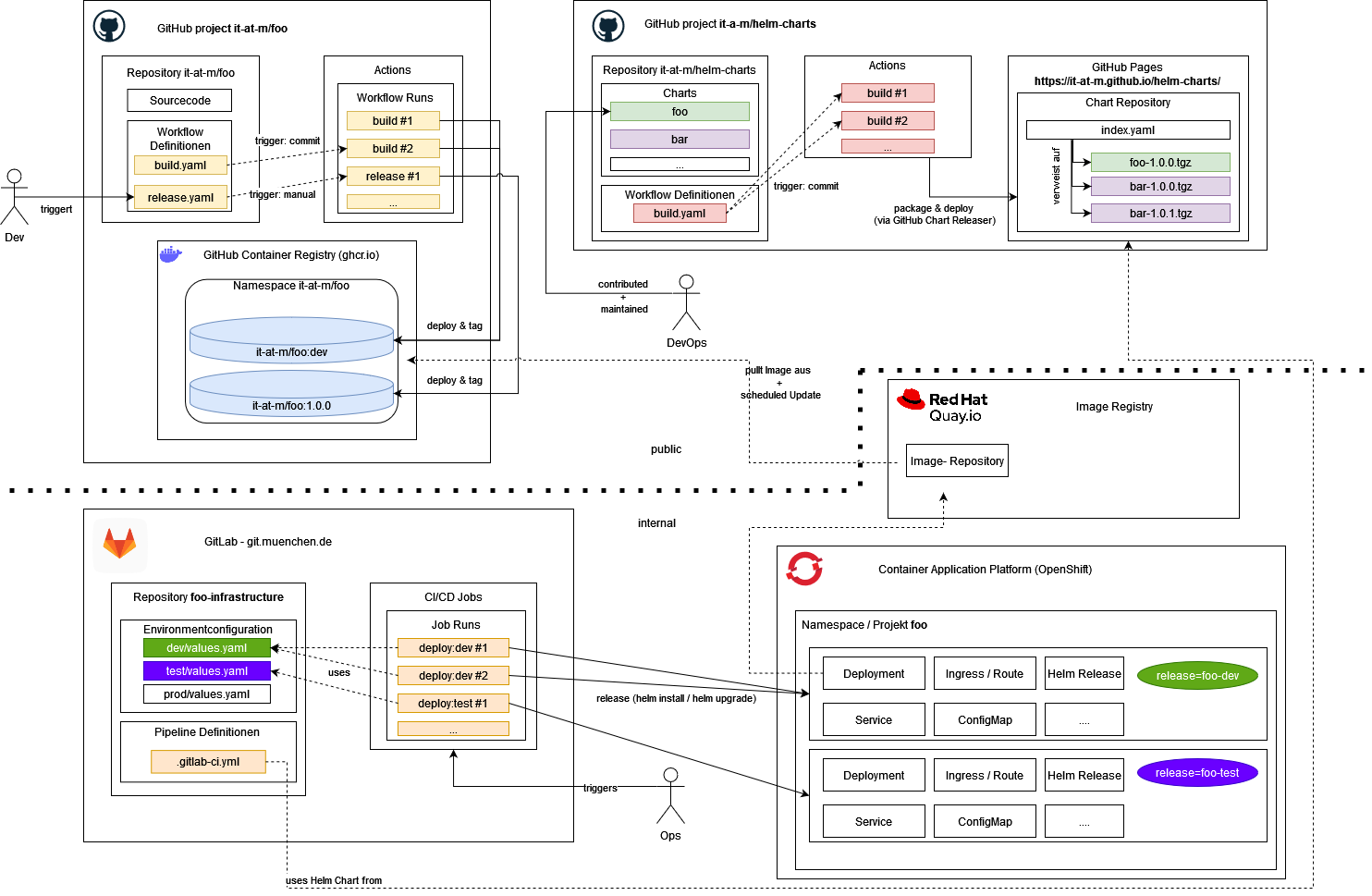 _The diagram shows an overview of the steps for delivering our applications, from code changes to deployment in our environment:
- GitHub Project
it-at-m/foo: Add code changes, compile and build code, build images - GitHub Project
it-at-m/helm-charts: Provide helm charts for project images - Image Registry
Quai.io: Internal image registry, synchronized with our project images - GitLab
git.muenchen.de: Internal Git repository to run deployment pipelines - OpenShift
Container Application Platform: Internal kubernetes plattform to run applications
You can find further details in the following chapters._
Source repository (GitHub Project it-at-m/foo)
Execute GitHub Actions to compile and build code, build images. For more information see workflows.md.
Helm Chart (GitHub Project it-at-m/helm-charts)
In the repository it-at-m/helm-charts we provide helm charts for Docker images created in our project repos. We created a template-chart. You can configure dynamically in the values.yml the frontend, backend, eai Docker image.
Internal Deployment (Image Repository Quay, Git Repository GitLab git.muenchen.de, Kubernetes platform OpenShift)
What are we using internally
- Image Registry Red Hat Quay to synchronize Docker images
- GitLab to execute internal infrastructure pipelines (IaC) and configuration of the applications
- OpenShift, our Kubernetes platform to host the applications
How it works together
Autorollout: For the dev environment (only not prductive enviornment)
An automatic rollout is implemented. We create an image stream that links to the internal image registry (Quay). The deployment includes a special annotation that prompts the internal kubernetes platform (OpenShift) to automatically trigger a new rollout when a new image becomes available. For more details, see this documentation.
manual rollout for the deployment in productive and close to productive environments
For other environments (stage, prod), a manual rollout is implemented. You have to specify the image version for each service in the Helm configuration file values.yml as well paying attention to use the image from the internal image registry and not from the GitHub Registry.